HubSpot CRM Replication: What It Is, How It Works, and Why Your Data Team Needs It
HubSpot CRM replication is the process of copying HubSpot CRM data into another database, data warehouse, or analytics platform while preserving original records. It gives data teams access to CRM data for analytics, reporting, and business intelligence without relying on HubSpot as the primary source for every query.
This guide will walk through what HubSpot CRM replication is, how it works, and when it makes the most sense for your team.
What HubSpot CRM Replication Actually Means
At its core, HubSpot CRM replication is about maintaining a complete and continuously updated copy of your CRM data outside HubSpot. The replicated data can include contacts, companies, deals, tickets, line items, custom objects, associations, and property history. Its main objective is to give teams access to an updated external database without relying on periodic exports or querying the HubSpot API every time.
HubSpot CRM replication is often confused with other types of data movement, but there are important differences:
- Point-in-time exports: A CSV export or one-time API pull captures a snapshot of your data. It becomes outdated as soon as records change in HubSpot.
- Bidirectional integrations: Integrations exchange data between systems, often in both directions. Replication is typically one-way with HubSpot as its source and the destination maintaining an up-to-date copy.
It’s important to understand these nuances when planning a data project. The goal of any integration is to keep systems synchronized for operational workflows. The goal of HubSpot CRM replication is to maintain a reliable copy of CRM data that can combine with other business systems without placing additional load on HubSpot.
Why Teams Reach for This
When an organization implements HubSpot CRM replication, it’s often brought by the need for reliable access to CRM data outside of HubSpot, but it could also be for:
- Advanced Analytics and Business Intelligence
HubSpot’s reporting tools work well for sales and marketing metrics but aren’t designed for complex analysis across multiple business systems. Replicating CRM data to Snowflake, BigQuery, or any warehouse enables combining HubSpot data with ERP, finance, support, and product usage data.
- Compliance and Audit Requirements
Organizations in regulated industries like financial services and healthcare often need an external copy of CRM data. It’s a requirement for audit trails, historical recordkeeping, and disaster recovery. Replication helps preserve customer records independently of the CRM platform and supports long-term data retention requirements.
- Finance and Operations Reconciliation
Reconciling HubSpot deals with invoices, payments, or ERP records is much easier when all data is centralized. With replication, any manual work is reduced, and cross-system validation is simplified.
- Reduced Reliance on API Limits and Availability
Querying the HubSpot API for every dashboard or report can introduce latency and consume API requests. With replication, reporting tools query the replicated database instead. This improves performance while reducing the impact of API rate limits or service disruptions.
How HubSpot CRM Replication Actually Works
Unlike traditional databases, HubSpot does not provide transaction logs for change data capture (CDC). Instead, a well-built replication pipeline against HubSpot relies on a combination of APIs, incremental polling, and webhooks to keep an external database or data warehouse synchronized with CRM data.
A typical replication pipeline works as follows:
1. Retrieve CRM data through the HubSpot API
Replication starts with the HubSpot CRM API, where tools retrieve standard objects (contacts, companies, deals, tickets, and line items) via/crm/v3/objects/{objectType}, with associations handled separately via v4.
Most replication tools use batch endpoints rather than individual record requests. A single batch call can retrieve up to 100 records and counts as one request against your daily API limit. This increases efficiency and removes the need for individual requests.
2. Detect changes with incremental polling
Since HubSpot doesn’t expose database change logs, replication tools periodically check for records that have changed since the last sync. They do this using modification timestamps, which allows only new or updated records to be processed. This keeps API consumption predictable and avoids re-pulling the entire dataset on every cycle.
The tradeoff is that polling introduces a small lag between when a change occurs in HubSpot and when it lands in the destination, which is why high-frequency polling is paired with webhooks rather than used in isolation.
3. Use webhooks for faster updates
Webhooks allow HubSpot to push a notification the moment a subscribed event occurs. It may be a contact property changing, a deal moving stages, or a record created or deleted. This closes most of the latency gaps that polling creates.
However, HubSpot webhook payloads are change events, not record snapshots. Each payload only contains the object ID, the specific property that changed, and its new value. The replication tool is still responsible for calling the API to retrieve the full current state of the record before writing it to the destination. Treating the webhook payload as the record itself is a common source of incomplete data in homegrown pipelines.
4. Reconcile data to maintain accuracy
No event-driven pipeline is perfectly reliable in practice. Sometimes network issues, API rate limits, or failed webhook deliveries can cause missed updates. To resolve these, most replication platforms also perform a scheduled reconciliation check. This helps ensure the replicated data remains complete and accurate over time.
Build vs Buy: Which Approach Is Right?
The right decision depends on your team’s resources and long-term requirements. Here are some of the considerations to look out for:
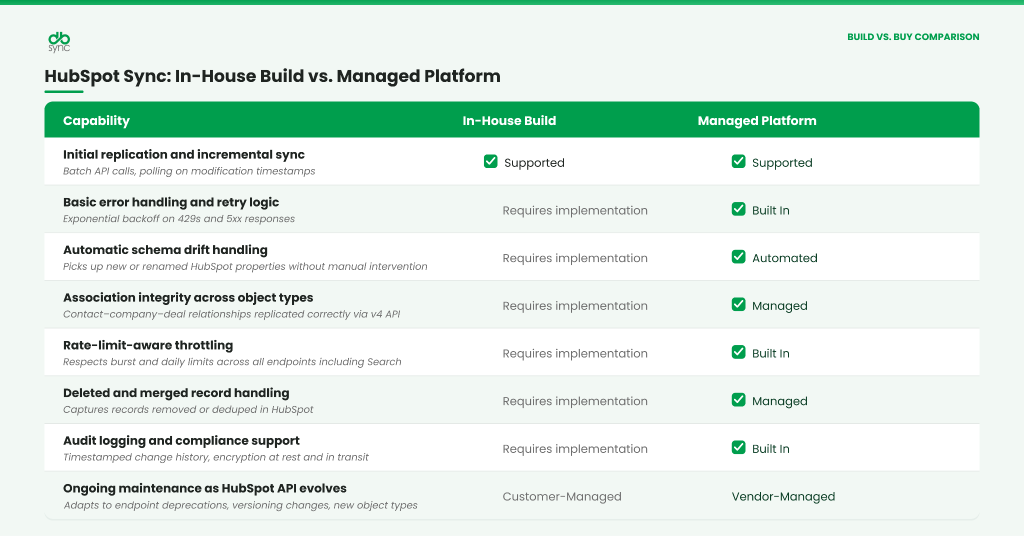
Whether you build or buy, the objective is the same. It needs to maintain an accurate, reliable, and continuously synchronized copy of your HubSpot CRM data. The difference lies in how much effort you’re willing to invest in building and maintaining that capability over time.
Where DBSync Fits
DBSync’s HubSpot CRM Replication Connector handles the full replication pipeline. From initial data extraction to continuous synchronization across databases, data warehouses, and data lakes. You can just connect HubSpot, connect your target, and let it run.
Apart from that, schema changes on HubSpot’s side are picked up automatically, so a new custom property doesn’t mean a broken pipeline. You get logs and alerts when something needs attention, and nothing when it doesn’t. It’s a no-code connector that runs on-prem or in the cloud. Plus, it’s built on the same SOC 2, HIPAA, and GDPR compliance foundation as every other DBSync connector.
Want to see it against a live environment before committing? The DBSync Data Replication Playground lets you test the connector without a full deployment.
Frequently Asked Questions (FAQ)
1. How fresh can replicated HubSpot data realistically be?
With a well-built pipeline combining webhooks and tight polling intervals, sub-minute to a few-minute freshness is realistic for most objects. True sub-second freshness isn’t achievable given HubSpot’s API model — anyone promising that for HubSpot specifically is overselling it.
2. How is HubSpot CRM replication different from HubSpot’s Operations Hub data sync?
HubSpot CRM replication and Operations Hub serve entirely different purposes. Operations Hub sync keeps two active systems functionally aligned in a bidirectional way. On the other hand, replication creates a continuously updated copy of
HubSpot data in a warehouse or database. If you need HubSpot and Salesforce reflecting the same records, Operations Hub handles that. If you need HubSpot deal data sitting next to ERP revenue figures in Snowflake, that’s a replication problem.
3. How do I know if my HubSpot replication pipeline is healthy?
Regularly monitor sync status, replication latency, record count consistency, and unresolved errors. If syncs complete on time and your destination closely matches HubSpot, your replication pipeline is generally operating as expected.