





Legal
Stop manually moving data between Litify and your books
DBSync connects Litify and your legal practice management stack directly to QuickBooks, NetSuite, and Xero, automating billing, trust accounting, and collections without anyone touching a keyboard in between.
- Litify + Salesforce native
- Trust accounting compliant
- IOLTA-safe workflows
Built for Litify firms
Litify runs your practice. DBSync connects it to your books.
Litify is purpose-built for high-volume legal practices on the Salesforce platform but it doesn't natively push matter data, time entries, or fee distributions into your accounting system. That gap costs your billing team hours every week.
DBSync bridges that gap with pre-built connectors for Litify, Salesforce, QuickBooks, NetSuite, and Xero, automating every accounting handoff without replacing any of the tools your firm already runs on.
Litify is built on Salesforce
DBSync's Salesforce connector works natively with all Litify objects including Matters, Contacts, Accounts, and custom fee objects.
No middleware required
DBSync connects directly to both systems with no custom development, no scripts to maintain, and no IT dependency.
Works with your existing Litify setup
no configuration changes to your Litify org required. DBSync reads and writes via the Salesforce API.
The problem
Why legal billing and accounting is still mostly manual work
Litify manages your matters perfectly. QuickBooks manages your books perfectly. The gap between them is where your billing team lives and where revenue gets lost.
Billing team re-enters everything
Time entries, expenses, and client details created in Litify have to be manually re-entered into QuickBooks or NetSuite to generate invoices. It takes hours, introduces errors, and delays getting bills out the door.
Trust accounting done in spreadsheets
IOLTA trust accounts require precise, real-time tracking of client funds. Most firms track trust balances in spreadsheets alongside their accounting software, a system that's one manual error away from a bar complaint.
Collections visibility is always stale
Payments posted in QuickBooks aren't visible in Litify, so case managers and fee earners don't know what's been collected. Reconciling outstanding AR requires pulling reports from two systems, every time.
Commingling client trust funds with operating funds is a leading cause of attorney disciplinary action - including disbarment.
DBSync's IOLTA workflows maintain strict separation of trust and operating account transactions, with a logged, auditable trail of every fund movement, satisfying state bar bookkeeping requirements without manual spreadsheet reconciliation.
Legal use cases
Six workflows legal firms automate with DBSync
Each mapped to the product that powers it.
Patient record sync
Trust deposits and disbursements sync between Litify and your accounting system with strict operating/trust account separation, maintaining IOLTA compliance without spreadsheets.
Time & expense sync
Billable hours and expense entries logged in Litify sync to accounting as invoice line items, with matter codes, billing rates, and attorney details preserved.
Trust & IOLTA accounting
Trust deposits and disbursements sync between Litify and your accounting system with strict operating/trust account separation, maintaining IOLTA compliance without spreadsheets.
Collections & payment writeback
Payments posted in QuickBooks or NetSuite sync back to Litify matters in real time, so case managers always see current AR status without leaving Litify.
Client & contact deduplication
Client records in Litify sync to accounting as matched customer records, deduplication rules prevent the duplicate client problem that plagues multi-system legal stacks.
Firm analytics & reporting
Replicate matter, billing, and collections data to a data warehouse or BI tool, enabling firm-wide revenue analytics, attorney performance reporting, and collections forecasting.
Who it's built for
Every team that touches legal data and dollars
DBSync serves both the operational teams managing billing and trust accounts, and the IT teams responsible for firm data infrastructure and reporting.
Cloud Workflow
For Managing Partners, CFOs & Billing Teams
Automates billing, trust accounting, collections, and financial reporting workflows between Litify, Salesforce, and your accounting system.
Your team's outcomes
Bills out faster
Invoices generated automatically when matters hit billing milestones, no waiting for manual entry from the billing team.
Trust accounts always reconciled
IOLTA-safe workflows keep client trust funds separated and logged, bar compliance without spreadsheet maintenance.
Real-time AR visibility
Collections status in Litify reflects what's been paid, case managers and partners see current AR without leaving their matter view.
Cloud Replication
For IT Directors & Analytics Teams
Continuously replicates Litify, Salesforce, and accounting data to a central warehouse or reporting database for firm-wide analytics and data governance.
Your team's outcomes
Firm analytics at scale
Attorney productivity, matter profitability, and collections performance — replicated to Snowflake, Redshift, or SQL Server for your BI tools.
Data backup for Litify & Salesforce
A continuously updated, independently accessible copy of your matter records — readable even when Salesforce or Litify experience downtime.
Audit-ready financial records
Replicated billing and collections data with an immutable pipeline log — satisfying bar association bookkeeping requirements and financial audit evidence.
How it works
Connect Litify and your accounting system
Authenticate your Litify org (via Salesforce API) and your accounting system using DBSync's pre-built connectors. Takes minutes, not weeks.
01
Connect your stack
Authenticate your Litify org (via Salesforce API) and your accounting system using DBSync's pre-built connectors. Takes minutes, not weeks.
02
Map your matter fields to your accounting fields
Use DBSync's visual field mapper to define exactly how Litify objects: Matters, Contacts, Time Entries, map to your invoice and customer fields. Set your trust account rules and trigger conditions.
03
Let every billing workflow run itself
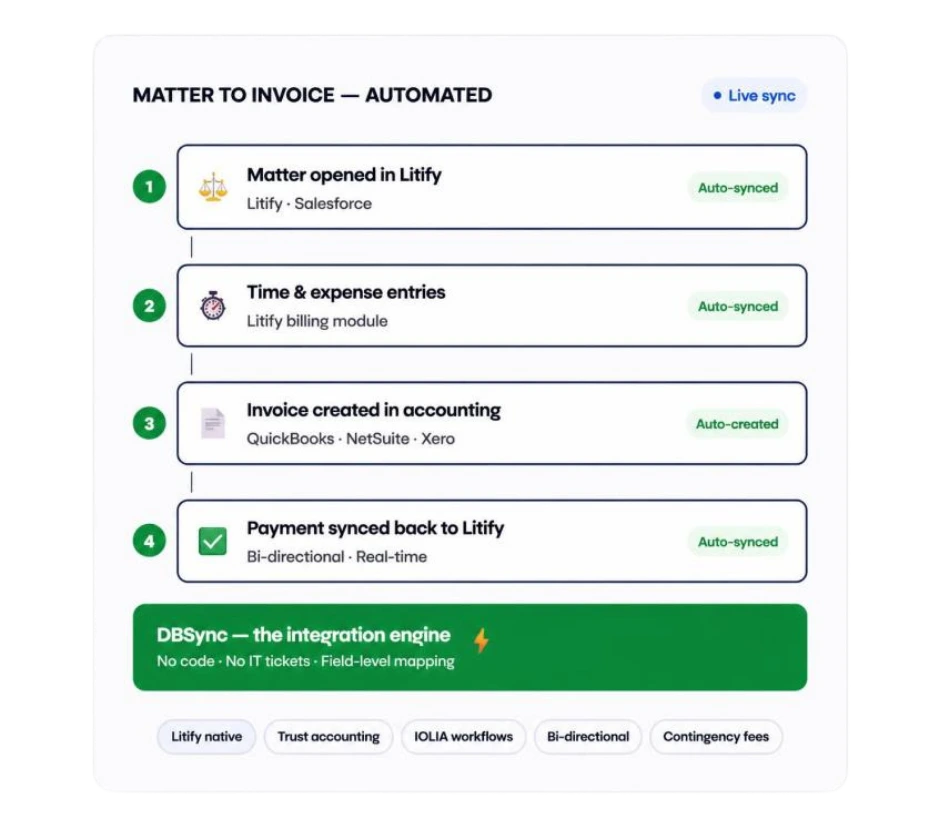
Matters open. Time entries log. Invoices appear in accounting automatically. Payments sync back to Litify. Your billing team manages exceptions, not exports.
What DBSync automates
Six legal billing workflows your team won't do manually anymore
Once Litify and your accounting system are connected, these all run on their own.
Matter-to-invoice creation
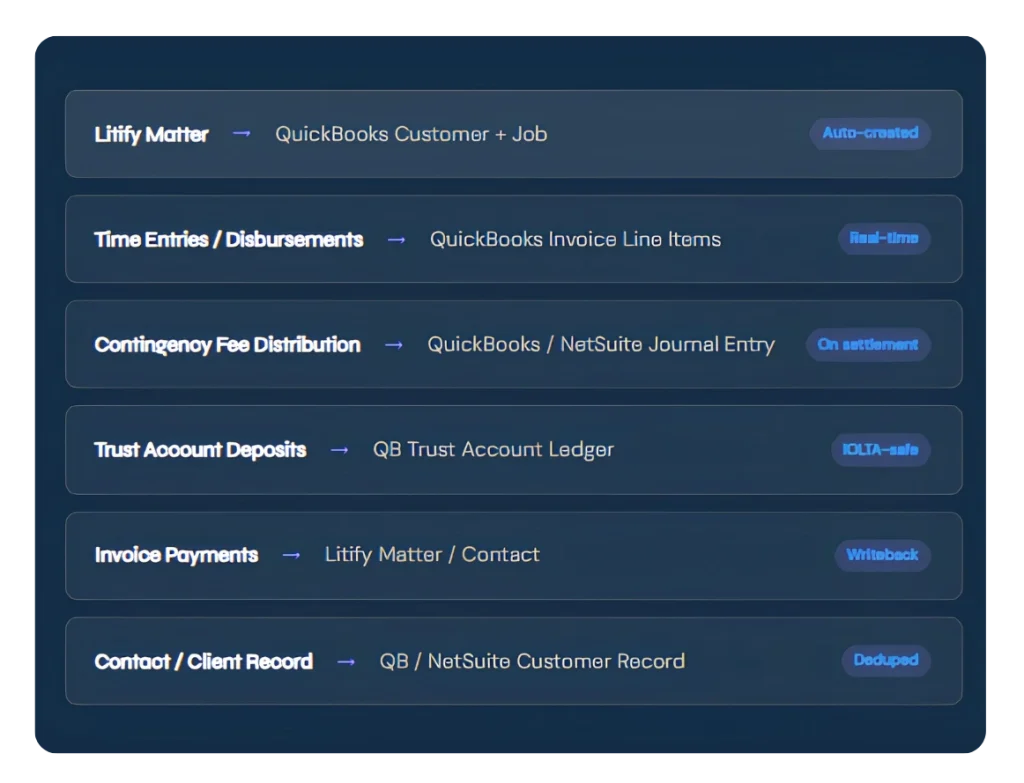
Every billable matter in Litify auto-generates a corresponding customer and invoice shell in QuickBooks or NetSuite, ready to populate with time entries.
Time entry sync
Billable hours logged by attorneys in Litify appear as invoice line items in accounting, with rates, descriptions, and matter codes intact. No re-entry.
Contingency fee distribution
On settlement, fee splits between attorneys, referral partners, and the firm sync automatically as journal entries, eliminating manual calculation and entry.
Trust account management
Client retainer deposits and trust disbursements sync with strict operating/trust separation, maintaining your IOLTA ledger automatically with a logged audit trail.
Payment & collections writeback
Invoice payments recorded in QuickBooks sync back to Litify matter records in real time, giving attorneys and case managers current collection status in their daily workflow.
AR aging & collections reporting
Outstanding balances, aging buckets, and collections rates replicate to your reporting database, giving firm leadership a live AR dashboard without manual exports.
Manual invoice re-entry from matter open to invoice sent
Trust account sync: IOLTA-compliant, always reconciled
Connected platforms: Litify, Salesforce, QB, NetSuite, Xero, and more
Typical setup time for core Litify → QuickBooks workflow
Connected systems
Every platform in your legal technology stack
Pre-built connectors for the practice management, accounting, and analytics tools law firms actually use.
Practice Management
- Litify
- Salesforce (all orgs)
- Filevine
- Clio (via API)
- MyCase (via API)
Accounting & Finance
- QuickBooks Online
- QuickBooks Desktop
- NetSuite
- Xero
- Sage Intacct
CRM & Operations
- Salesforce CRM
- HubSpot
- Microsoft Dynamics 365
- monday.com
- Business Central
Analytics & Warehousing
- Snowflake
- AWS Redshift
- Azure Synapse
- SQL Server / PostgreSQL
- Databricks
Legal compliance
Trust accounting done right. Every transaction. Every firm.
DBSync's legal workflows are designed to satisfy state bar bookkeeping requirements and legal accounting standards without adding manual overhead.
Operating & trust fund separation
DBSync enforces strict separation between client trust funds and operating account transactions — every deposit and disbursement is routed to the correct account based on your configured rules.
Immutable transaction log
Every trust account movement is logged with timestamp, matter reference, amount, source, and destination — providing the detailed transaction record required by state bar rules.
Bank, ledger & client balance sync
DBSync keeps your accounting system trust ledger current with each Litify transaction — making three-way trust reconciliation a check, not a manual process.
Per-matter trust ledger tracking
Client trust funds are tracked at the matter level — DBSync maps each trust transaction to the correct Litify matter so per-client fund balances are always accurate.
Contingency & referral fee records
Fee splits and referral payments created at settlement sync as properly structured journal entries — maintaining the records required for compensation plan audits and state bar review.
RBAC on all financial workflows
Role-based access controls ensure only authorized billing and accounting staff can modify financial workflow configurations — maintaining separation of duties across your firm's financial data.
Common legal data flows
The integrations law firms build with DBSync
Workflow automation for billing and operations. Replication pipelines for IT and analytics.
Dataverse
Legal On-Demand Demos
See DBSync in Action

Effortless Integration
Link CRM with accounting/ERP apps.

Automated Workflows
Streamline invoicing and data tasks with no-code automation.

Continuous Sync
Keep data in real-time harmony with connected apps.

Customer Testimonials
Don't just take our word for it
Ready to stop re-entering data from Litify into QuickBooks?
Talk to a legal specialist. Pre-built Litify connectors. Setup in under 2 hours.
- No credit card required
- Litify native via Salesforce API
- IOLTA-safe trust workflows
- Setup in under 2 hours
DBSync simplified our data management, seamlessly adapting to our evolving systems. Effortless integration, time savings, and unmatched cost-effectiveness — it's become the backbone of how our financial data flows.
Trisha Buyer Chief Operating Officer · Phocuswright