
DBSync Developer Hub
Build integrations, automate workflows, and replicate data across SaaS applications and databases using DBSync’s integration platform.
Connect SaaS apps, enterprise systems, databases, and custom services using CLI tools, APIs, CDC, and connector frameworks.
- Home
- »
- DBSync Developer Hub
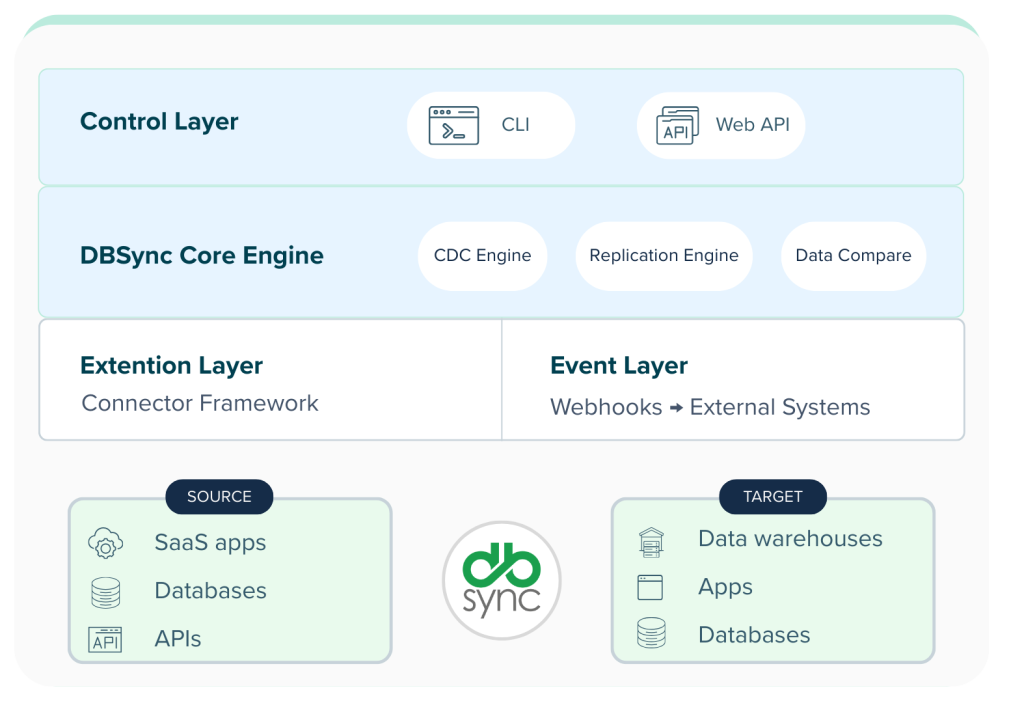
The DBSync architecture at a glance
DBSync is built as a modular data synchronization platform with programmable control surfaces and a change-driven replication engine.
At a high level, the system consists of the following core components:
Start building with DBSync
Get started with DBSync using the path that fits your workflow.
Developer edition
Free access for developers to test replication, workflows, and custom connectors. Use Developer Edition to:
- Test SaaS-to-database replication
- Perform full CRM snapshots for development
- Validate data migration scenarios
- Simulate backup and recovery
- Build and test custom connectors
Get trained
Integration fundamentals Use Developer Edition to:
- Integration fundamentals
- SaaS replication
- Database replication
- Cloud workflow automation
- Connector development
Sample projects & templates
Pre-built templates to accelerate common integration scenarios. Examples include:
- Salesforce → Accounting system sync
- Database-to-database replication
- SaaS ingestion into analytics warehouse
- Simulate backup and recovery
- CRM → ERP integration
Template gallery coming soon.
Design and deploy with confidence
Design, develop, and deploy integrations and replication pipelines using official documentation and technical guides.
Official documentation
Complete reference for:
- Integration setup
- SaaS replication
- Database replication
- CDC configuration
- Data Compare
- Workflow automation
- Troubleshooting and best practices
Wiki & tutorials
Quick-start and deep-dive guides for:
- SaaS Replication Overview
- Database Replication Overview
- SaaS replication
- Cloud Workflow Automation (v6.0+)
- Supported Connectors
For account, licensing, and operational questions, visit- https://www.mydbsync.com/support
Programmatic control & extensibility
Programmatically control DBSync and extend its capabilities.
REST API
Trigger and monitor sync jobs through secure REST endpoints.
Use cases:
- Trigger sync runs from external systems
- Retrieve job logs and execution history
- Manage profiles and environments
- Integrate DBSync into internal dashboards
Authentication:
- API Keys
- OAuth (where applicable)
API reference documentation →
CLI
Operate DBSync via command line for automation and CI/CD workflows.
Common commands include:
- Project initialization
- Profile configuration
- Job execution
- Status monitoring
CLI reference and examples →
Sample projects & templates
Pre-built templates to accelerate common integration scenarios.
Examples include:
- Salesforce → Accounting system sync
- Database-to-database replication
- SaaS ingestion into analytics warehouse
- CRM → ERP integration
Template gallery coming soon.
See DBSync in action
Technical walkthroughs, demos, and architecture sessions.
How-to videos
Official DBSync YouTube channel: https://www.youtube.com/mydbsync
Featured developer-focused topics:
- Cloud Replication Demo
- Copy Data Management (CDM) Overview
- Xero Connector Setup
- Dynamics 365 F&O → Analytics Warehouse Replication
- Salesforce → QuickBooks Sync
- Database Replication Quick Start
Webinars & deep dives
Advanced sessions covering:
- Hybrid ETL/ELT pipelines
- Advanced replication strategies
- API Server configuration
- What’s New in DBSync
Watch on-demand or register for upcoming webinars:
Watch webinars →
Get help and stay connected
Connect with the DBSync developer community and support teams.
Developer Community
Join discussions, ask questions, and share integration patterns in our community hub.
Support
Developer support available under subscription tiers.
General Support: support-ipaas@mydbsync.com
Replication (CDM) Support: support-cdm@mydbsync.com
Support Portal:
www.mydbsync.com/support
Contact the Developer team
Have feedback or suggestions?