
What Is Data Quality?
Data quality is the degree to which data meets expectations for accuracy, completeness, consistency, timeliness, and relevance, ensuring it is trustworthy and fit for its intended purpose.
Why Data Quality Matters More Than Ever
Poor data quality costs organizations an average of $12.9 million per year, according to Gartner. When data is inaccurate, incomplete, or inconsistent, every downstream process suffers, from analytics and reporting to customer communications and compliance audits.
In the context of data integration, where information flows between CRMs, ERPs, accounting systems, and data warehouses, quality is not optional. It is the foundation that determines whether your integrations create value or create chaos.
Real-World Example
Your Salesforce CRM lists a customer as “Acme Corp.” At the same time, QuickBooks records the same entity as “ACME Corporation Inc.” Without quality controls, this mismatch can create duplicate invoices, broken reports, and frustrated finance teams. DBSync’s field normalization and bidirectional sync prevent these issues at the source.
The 6 Core Dimensions of Data Quality
Every data quality discussion bottoms out in the same six dimensions. The table below defines each one and maps it to a specific DBSync enforcement mechanism.
| Dimension | What It Means | DBSync Enforcement |
|---|---|---|
| Accuracy | Data correctly represents the real-world entity or event. Inaccurate CRM emails mean lost leads; wrong ERP prices mean revenue leakage. | DBSync field-level mapping rules and schema validation prevent corrupted values from propagating across systems. |
| Completeness | All required data elements are present. Missing billing addresses or SKUs break integration workflows downstream. | Cloud Workflow routes records with empty required fields to a review queue before loading into the target system. |
| Consistency | The same data in different systems doesn’t contradict itself , e.g., an address updated in Dynamics 365 but not QuickBooks. | Bidirectional sync propagates changes in real time across all connected systems, resolving conflicts with configurable resolution rules. |
| Timeliness | Data must be current when used. Stale dashboards and outdated inventory counts cause operational errors. | Scheduled replication and CDC (Change Data Capture) ensure near-real-time data currency across your integrated stack. |
| Validity | Data must conform to defined formats and rules. An email field with a text string or a date field with arbitrary text breaks downstream logic. | Schema-aware connectors enforce format validation during ETL/ELT, catching violations before they reach target systems. |
| Uniqueness | Each entity is represented exactly once. Duplicates inflate counts, skew analytics, and waste reconciliation effort. | Built-in deduplication during sync prevents the last-write-wins problem that silently overwrites good data. |
1. Accuracy
Accuracy measures whether data correctly represents the real-world entity or event it describes. An inaccurate email address in your CRM means lost leads. An inaccurate product price in your ERP means revenue leakage.
| DBSync Perspective: DBSync’s field-level mapping rules allow you to define transformation logic that normalizes values before they reach target systems. For example, a Cloud Workflow rule can standardize company name formats (“ACME Corp” → “Acme Corporation”) during sync, preventing accuracy drift at scale. |
2. Completeness
Completeness measures whether all required data elements are present. A customer record missing a billing address, a product record without a SKU, or an invoice without a line item, these gaps break integration workflows.
| DBSync Perspective: When DBSync replicates data from Salesforce to SQL Server or Snowflake, completeness checks ensure no critical fields arrive empty. Cloud Workflow conditional logic routes incomplete records to a designated review queue, keeping clean records flowing without delay. |
3. Consistency
Consistency ensures that the same data stored in different systems does not contradict itself. If a customer’s address is updated in Dynamics 365 but not in QuickBooks, you have an inconsistency that cascades into billing errors and misaligned reporting.
| DBSync Perspective: Bidirectional sync with configurable conflict resolution is DBSync’s answer to consistency. Changes in any connected system propagate in real time across all others. Conflict resolution rules (e.g., “source system wins,” “most recent timestamp wins”) prevent the last-write-wins problem that silently corrupts data. |
4. Timeliness
Data must be current when it is used. A sales dashboard showing yesterday’s pipeline instead of today’s is stale. A warehouse inventory count that is three hours old can cause overselling. Timeliness is not just a reporting concern, it is an operational one.
| DBSync Perspective: DBSync supports both scheduled batch replication and CDC (Change Data Capture)-based near-real-time sync. CDC tracks row-level changes at the database level, streaming only changed records into target systems as they occur, ensuring your data reflects reality, not history. |
5. Validity
Validity checks whether data conforms to defined rules and formats. An email field should contain a valid email format. A date field should hold an actual date, not a text string. Validity violations are often silent , they do not cause immediate errors, but they corrupt analytics and reporting downstream.
| DBSync Perspective: DBSync’s schema-aware connectors enforce format validation during the ETL/ELT process, catching validity violations before they reach target systems. Custom validation rules within Cloud Workflow allow teams to define business-specific validity criteria, not just data-type-level checks. |
6. Uniqueness
Uniqueness ensures each entity is represented exactly once. Duplicate customer records, invoices, and product entries inflate counts, skew analytics, and waste reconciliation effort. Deduplication is not a one-time cleanup task, it is an ongoing discipline.
| DBSync Perspective: DBSync’s built-in deduplication logic runs during sync, matching records against configurable key fields before inserting into target systems. For bidirectional scenarios, conflict resolution rules prevent the scenario where two systems each update the same record and the last writer silently overwrites good data with stale data. |
Common Data Quality Challenges in Integration
Schema Drift
When Salesforce adds a custom field or a source database schema evolves, your target may not have the corresponding column. Without automated schema detection, this silently drops data or causes sync failures.
DBSync’s schema-aware replication automatically detects schema differences and generates corresponding columns in the target without dropping existing data, a critical safeguard for production integrations.
Transformation Errors
During ETL pipelines, bugs in transformation logic silently corrupt downstream data. A type mismatch, a truncated string, or a failed lookup can propagate bad records across every connected system before anyone notices.
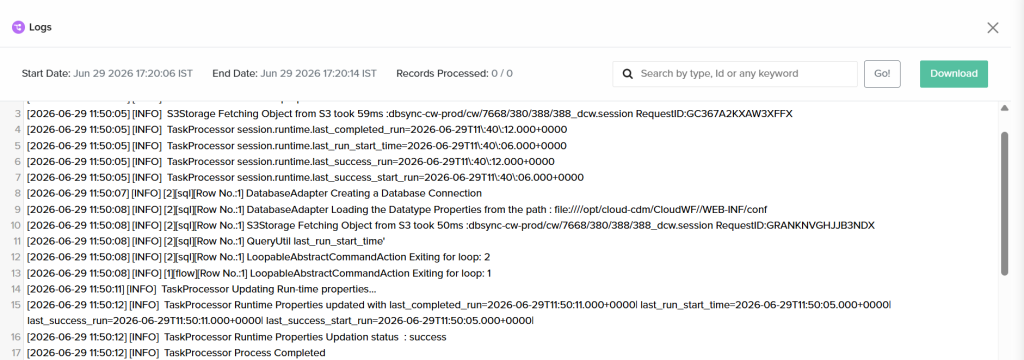
This is why DBSync embeds data validation checkpoints at three stages: before extraction, after transformation, and after loading into the target. Each stage surfaces errors in execution logs with enough context to diagnose and fix at the source.
Inconsistent Data Entry Practices
Sales reps abbreviate company names differently. Finance teams use varying date formats. Operations skip optional fields. These inconsistencies compound across systems and are nearly impossible to fix after the fact.
DBSync Cloud Workflow standardization rules catch these inconsistencies at the integration layer, normalizing formats, enforcing required fields, and applying lookup-based cleansing, before bad data propagates.
Multi-System Conflict Resolution
In bidirectional sync environments, two systems can update the same record simultaneously. Without a defined resolution strategy, the result is unpredictable, and often invisible.
| DBSync Conflict Resolution Options: Source-system-wins, timestamp-wins, field-level merge, and manual review queue. Each strategy is configurable per integration, per object type, giving operations teams full control over how conflicts are handled without requiring developer intervention. |
How to Improve Data Quality: A Practical Framework
Data quality improvement is not a project, it is a practice. These four steps form a repeatable framework for organizations that want to move from reactive cleanup to proactive governance.
| Data Profiling: Examine your datasets to understand structure, content distributions, and anomalies before building any integrations. This diagnostic step prevents you from replicating bad data across systems. DBSync supports profiling runs against source schemas before any sync job is configured. |
| Data Governance Policies: Define who owns each data domain, what quality standards apply, and how violations are escalated. Without governance, quality improvements are ad-hoc and unsustainable. DBSync’s audit trails and role-based access support governance enforcement at the integration layer. |
| Automated Quality Controls: Embed quality checks directly into your integration platform. DBSync Cloud Workflow enables conditional logic, field-level validation, and error handling within every sync, so checks run automatically on every record, every time, without manual intervention. |
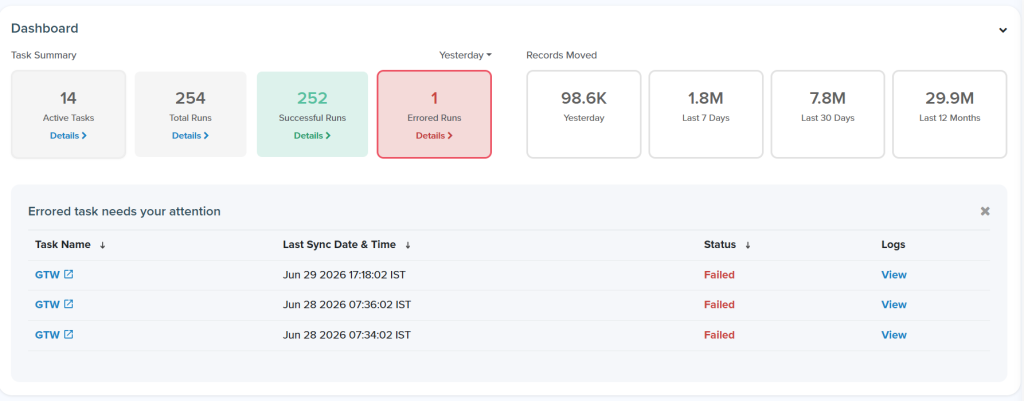
| Continuous Monitoring: Set up alerts for sync failures, record count mismatches, and schema changes. DBSync’s execution logs and email notifications provide this observability out of the box , turning reactive firefighting into proactive quality management. |
Data Quality Assessment Checklist
Use this checklist to evaluate your current data quality posture across all connected systems. The right column maps each check to the DBSync capability that addresses it.
| Checklist Item | How DBSync Addresses It |
|---|---|
| ✓ Are all required fields populated across your CRM, ERP, and accounting systems? | Cloud Replication completeness checks flag empty required fields before data lands in the target. |
| ✓ Do the same records in different systems contain the same values? | Bidirectional sync with conflict resolution keeps Salesforce, Dynamics 365, QuickBooks, and others in lockstep. |
| ✓ Are duplicate records identified and merged regularly? | Deduplication logic runs during sync, preventing the last-write-wins silent overwrite. |
| ✓ Is data refreshed at the frequency your business decisions require? | Choose from scheduled batch replication or CDC-based near-real-time sync depending on data velocity needs. |
| ✓ Are validation rules enforced during data entry and during integration? | Schema-aware connectors enforce format rules at the ETL layer, not just at the source. |
| ✓ Do you have audit trails showing when data was changed and by whom? | DBSync execution logs capture every record touched, timestamped, and attributable. |
| ✓ Are schema changes in source systems automatically detected by your integration platform? | DBSync auto-detects schema drift and generates corresponding target columns without dropping existing data. |
How DBSync Enforces Data Quality
DBSync’s platform enforces quality at multiple levels, across both its Cloud Replication and Cloud Workflow products. Here is how each product contributes to a comprehensive data quality posture.
| DBSync Cloud Replication | DBSync Cloud Workflow |
| Schema-aware connectors map the source to target automatically Schema drift detection generates new columns without data loss Incremental sync reduces the exposure surface for quality issues Bidirectional conflict resolution prevents silent overwrites Execution logs capture every record touched with timestamps Email notifications alert on sync failure or record mismatch | Conditional logic routes bad records to review queues Field-level validation rules enforce format and type constraints Data cleansing steps normalize values during transformation Error handling at every step surfaces failures with context Lookup-based standardization fixes inconsistent entries at sync time Record count checks post-load confirm no silent drops |
| Ready to Sync Your Data?Start free, schedule a demo, or explore the DBSync Playground. mydbsync.com | Schedule a Demo | Try the Playground |
