Complete Guide to Salesforce Shopify Integration for eCommerce
Salesforce was built to track relationships, while Shopify tracks transactions. However, it seems like neither was built to talk to the other. Most ecommerce teams end up either manually bridging the two or working with incomplete data on both sides.
Salesforce Shopify integration for eCommerce solves that by automating the flow of customer, order, product, and inventory data between the two platforms. The connection part is easy; the harder decisions come when you need to choose which data syncs, which direction it flows, how often it updates, and what happens when records conflict.
This guide covers how the integration works, what most businesses actually synchronize, the implementation approaches worth considering, and the things that tend to break in production.
What Data Needs to Sync Between Salesforce and Shopify
The data you synchronize depends on your business processes, but most Salesforce Shopify integrations include five core data types: customers, orders, products, inventory, and customer support information. Syncing too much will create noise while syncing too little defeats the purpose.
- Customers (Accounts and Contacts)
Customer data is typically among the first records to be synchronized between Shopify and Salesforce. When a customer places an order in Shopify, the integration can create a new Account and Contact or match the customer to an existing Salesforce record.
To maintain clean CRM data, you can include duplicate detection and record-matching rules in the integration. Email addresses are the most common matching field, but many businesses also use company names, domains, or unique customer IDs to improve matching accuracy. The integration should also account for customers who already exist in Salesforce as Leads or Contacts before they place their first order in Shopify.
Without proper matching logic, duplicate customer records can accumulate, creating inconsistent customer histories across both platforms.
- Orders
Order synchronization gives sales, operations, and customer service teams visibility into purchase activity without leaving Salesforce. Depending on your Salesforce configuration, Shopify orders may be synchronized as Salesforce Orders, Opportunities, or related custom objects.
For some businesses, it’s also useful to sync:
- Order Status
- Line items
- Product SKUs
- Quantities
- Pricing and discounts
- Payment status
- Fulfillment status
- Shipping information
A good integration also accounts for order updates (cancellations, partial fulfillment, refunds, etc.) so Salesforce reflects the latest transaction status.
- Products or Catalog
Product synchronization keeps product information consistent across Shopify and Salesforce. Usually, product data originates in Salesforce and is pushed to Shopify. Other businesses also manage their catalog directly in Shopify and synchronize product information into Salesforce for reporting and customer visibility.
Regardless of the direction, it’s important to define a single system responsible for maintaining product records. What’s important is to avoid editing independently on both platforms to prevent conflicting data.
- Inventory
Inventory synchronization helps prevent overselling and ensures customers see accurate stock levels. For some, it’s maintained in Shopify or a warehouse management system (WMS), with updates flowing to other connected platforms. Since inventory levels change frequently, businesses often use near real-time synchronization to keep stock counts accurate.
If Salesforce is not your inventory management system, inventory updates should generally flow directly from the stock management system rather than through Salesforce. Likewise, if your accounting software depends on inventory data, it’s usually more reliable to synchronize it directly from the inventory management system instead of routing it through another platform.
Learn more about the benefits of integrating inventory management software with accounting in our related guide.
- Customer Support Data
Synchronizing Shopify order history with Salesforce gives customer service teams more context when assisting customers. They can review recent purchases, fulfillment status, and previous orders without switching between systems. As a result, there are reduced response times and quicker resolution, especially in handling returns, exchanges, or inquiries.
Sync Direction: Bidirectional vs. Unidirectional
Salesforce Shopify integrations can synchronize data in one direction (unidirectional) or both directions (bidirectional). The right approach depends on where each type of data is created, maintained, and updated.
A good starting point is to identify which system owns each type of data, then define the synchronization direction from there. Although there’s no universal answer for sync direction, since it depends on where the data originates in your setup, most implementations follow a similar pattern:
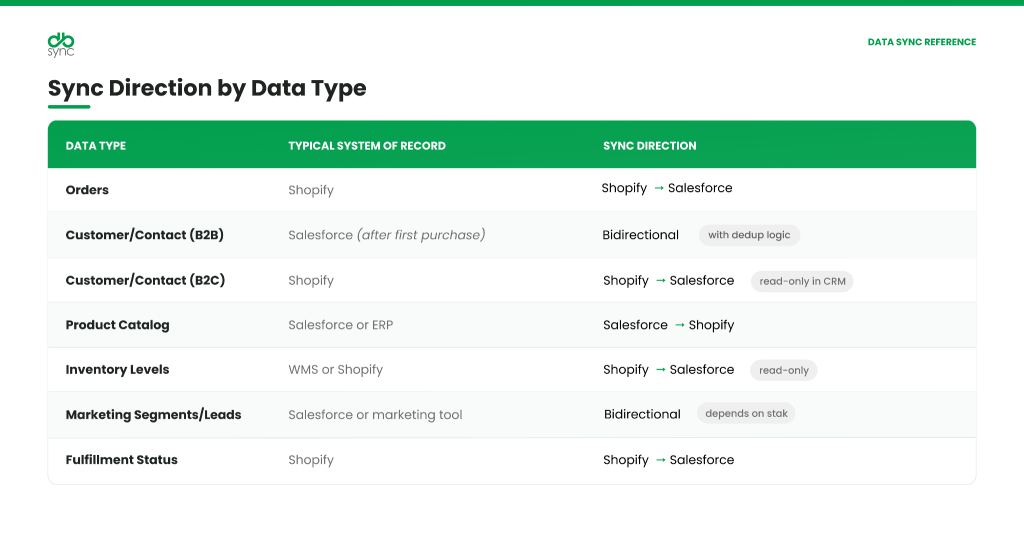
It’s important to remember that choosing the right sync direction during the design stage can help you maintain data consistency and reduce issues with synchronization and updates.
What Are the Common Integration Architectures
There are three common approaches to integrating Salesforce with Shopify: AppExchange integration solutions, custom API integrations, and integration platform as a service (iPaaS) solutions. The right option depends on your technical resources, customization requirements, and long-term maintenance strategy.
Option 1: Integration Platform as a Service (iPaaS)
An integration platform as a service (iPaaS) provides pre-built connectors, mapping tools, scheduling, monitoring, and error handling through a single platform. Instead of developing the integration from scratch, you can configure the synchronization rules and data mappings to make sure it fits your business process.
For example, DBSync provides a Salesforce-Shopify integration with pre-built templates for common data flows such as customer records, products, and orders. It also supports custom fields, custom objects, and configurable data mappings, allowing businesses to extend the integration without having to build and maintain custom code.
Best suited for: Teams that need more flexibility than a standard connector without the need for the development and maintenance effort of a fully custom integration.
Option 2: AppExchange Integration Solutions
The Salesforce AppExchange offers several third-party solutions for connecting Salesforce and Shopify. These are typically designed for faster deployment and require less technical configuration than a custom-built integration. Common synchronization scenarios involving customers, orders, and products are also supported by many AppExchange solutions.
However, businesses with custom Salesforce objects, complex workflows, or extensive Shopify customization may need additional configuration or development to support their requirements.
Best suited for: Businesses with standard integration requirements that want to reduce implementation time.
Option 3: Custom API Integration
A custom integration uses the Shopify APIs together with the Salesforce APIs to exchange data between the two platforms. This approach allows complete control over data mapping, business logic, synchronization rules, and error handling.
With this approach, every aspect of the integration is developed and maintained by your team. This also means every custom integration might require engineering resources for implementation, monitoring, testing, and ongoing maintenance.
Apart from this, planning should also include API version updates, schema changes, and evolving business requirements over time. This ongoing maintenance burden is exactly what tips many teams toward a build-vs-buy conversation before they commit engineering resources.
Best suited for: Organizations with unique integration requirements and dedicated development resources.
How DBSync Handles the Salesforce-Shopify Integration
DBSync is a certified Salesforce partner, and its pre-built Salesforce-to-Shopify integration template covers the core data flows most eCommerce teams need without requiring custom development:
- Salesforce to Shopify: Accounts sync as Customers, Products sync as Shopify Products, and Opportunities with their line items sync as Orders and Order Lines.
- Shopify to Salesforce: Customers sync back as Accounts, Products map to Salesforce Products, and Orders with line items sync as Opportunities and Opportunity Lines.
- Any Custom Object / Fields mapping: A big differentiator between DBSync and other pre-packaged solution is the flexibility to easily map and move data with custom objects or fields.
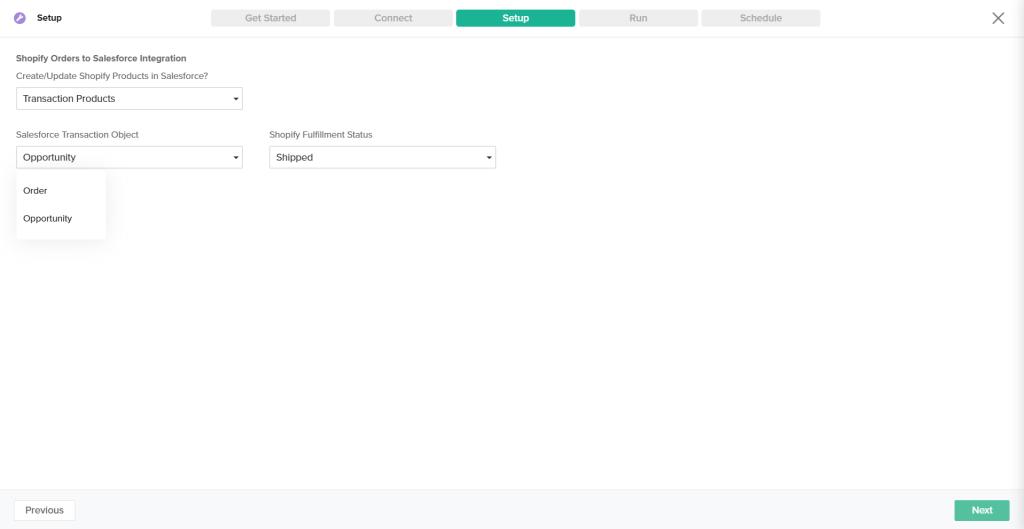
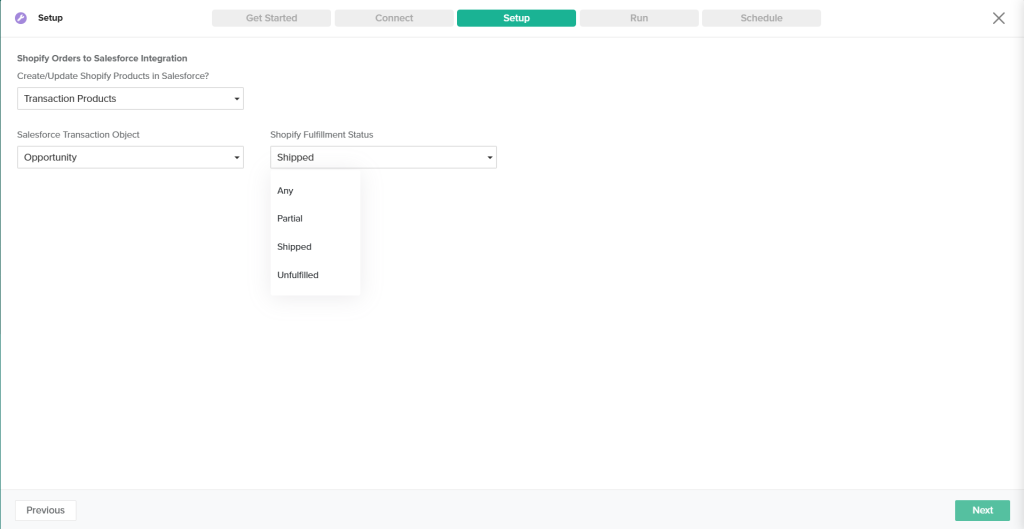
The integration supports both standard and custom field mapping, custom objects, and complex transformation logic for teams with non-standard requirements. Synchronization schedules can also be configured based on business needs. This includes near real-time intervals for use cases that require frequent updates.
In addition to data synchronization, the platform includes capabilities for monitoring integrations, logging errors, retrying failed transactions, and managing API connections. These features help organizations maintain reliable integrations without developing and supporting custom integration infrastructure.
Get started: Explore DBSync’s Salesforce-Shopify Integration
Frequently Asked Questions (FAQs)
- Does Salesforce have a native Shopify integration?
No, Salesforce does not offer an official native Shopify integration. To connect the two platforms, you need to use a third-party AppExchange solution, build a custom integration using the Salesforce and Shopify APIs (or an integration platform such as MuleSoft), or implement an iPaaS solution like DBSync that handles both sides of the connection.
- Can the Salesforce-Shopify integration handle bidirectional sync without creating duplicates?
Yes, a Salesforce-Shopify integration can support bidirectional synchronization without creating duplicate records, provided it is configured with appropriate record-matching rules. Most integrations compare incoming records against existing Salesforce or Shopify records using one or more unique identifiers, such as email addresses, customer IDs, or external IDs. If a matching record is found, the integration updates it instead of creating a new one.
- What happens if the Salesforce-Shopify integration goes down during a high-traffic period?
If the Salesforce-Shopify integration is temporarily unavailable, Shopify typically continues processing customer orders while synchronization is paused. Information like orders, customer updates, inventory changes, or fulfillment information may not appear in the other system until the integration is restored.
At DBSync, failed synchronization attempts are logged, and queued transactions are automatically retried once the connection is back. This helps administrators review error logs and identify or resolve issues faster. While the exact recovery process depends on the cause of the outage and the integration configuration.