What Is Data Deduplication? Methods, Benefits & How to Eliminate Duplicate Records
Your CRM says 20,000 customers.
Marketing’s platform says 15,400.
And finance just sent the same company two invoices, from two different customer records.
Three symptoms, one disease: duplicate records. This guide shows you how to find them, merge them without breaking anything, and, the part most teams skip, stop creating them in the first place.
In plain English: Data deduplication is finding records that describe the same real-world thing (a customer, an account, an invoice) and merging them into one accurate record. Done right, every entity exists exactly once, in every system.
What’s in this guide:
- Part 1: Duplicate records 101 – what they are, what they cost
- Part 2: The 3 ways to catch duplicates
- Part 3: Merging without breaking things
- Part 4: Shutting off the duplicate factory
- Part 5: Your 30-day dedup plan
- Plus a rapid-fire FAQ
Duplicate records 101
What counts as a duplicate?
Almost never an exact copy. Here’s one company, three times, in a real CRM:
| Field | Record 1 | Record 2 | Record 3 |
|---|---|---|---|
| Account name | Acme Corp | ACME Corporation Inc. | Acme |
| Email domain | acme.com | acme.com | acmecorp.com |
| Phone | (415) 555-0142 | 415.555.0142 | +1 415 555 0142 |
| Created via | Web form | List import | Manual entry |
A human sees one company.
A WHERE name = name query sees three strangers.
That gap – between human judgment and string equality – is the entire deduplication problem.
Closing it produces the golden record: one row carrying the best surviving value for every field.
What do duplicates actually cost
Duplicates hit three budgets:
1. Reports you can’t trust. Industry estimates put duplicates at 10–30% of a typical CRM. Customer counts inflate, pipeline splits across two versions of one account, and CAC and LTV get computed on fiction.
2. Customers you annoy. Three nurture emails to one person. Two reps calling the same buyer in the same week. Duplicate invoices – the fastest way to look disorganized to a client.
3. Compliance you can’t prove. A GDPR erasure request means erasing the person. Delete one copy, leave three, and a routine request becomes a violation.
Back-of-envelope math for your own data:
Records × duplicate rate × ~$1 per record per year = your annual duplicate tax.
100,000 records × 20% × $1 ≈ $20,000 a year – a conservative floor, since per-contact pricing in marketing tools alone often covers the $1, before counting a single misrouted deal or fine.
Where duplicates come from
Five inflows account for nearly all of them:
- Manual entry – a rep searches “ACME,” the record is filed as “Acme Corp,” search misses, a new account is born.
- List imports – a tradeshow CSV adds 500 contacts; 200 already existed.
- Web forms – one prospect downloads three whitepapers and becomes three people.
- Integrations without identity tracking – the multiplier. A sync that doesn’t track record IDs creates a new record every cycle. Same customer, duplicated every fifteen minutes, all weekend.
- Migrations – two CRMs consolidate, and every shared customer now exists twice.
One line worth remembering:
Humans create duplicates one at a time. Broken integrations create them by the thousand.
The 3 ways to catch duplicates
Method 1 – Exact matching
Same email. Same phone. Same invoice number. → Same record.
Deterministic, fast, and safe to auto-merge.
One catch: “exact” needs normalization first. ACME.com and acme.com are two strings and one domain. Lowercase, trim, standardize – then compare.
What it misses: everything else. Exact matching finds none of the three Acme records above.
Method 2 – Fuzzy matching
Scores similarity instead of demanding equality. Different algorithms catch different variation:
→ Edit distance (Levenshtein) catches typos → Jaro-Winkler suits person names → Phonetic matching (Metaphone) catches Steven / Stephen → Token comparison handles “Bank of Springfield” vs. “Springfield Bank”
Two things matter more than which algorithm you pick:
Fuzzy output is a score, not a verdict. Auto-merge above ~0.95. Send 0.80–0.95 to human review. Ignore the rest.
Scale needs blocking. A million records is ~500 billion pairs. Real systems only compare within candidate groups – same zip code, same domain, same first letter.
Method 3 – Rule-based matching
Your data, your logic:
Same email domain + same area code + similar company name → likely duplicate.
Rules layer on top of exact and fuzzy. They encode what “the same” means in your organization, which is why they’re tuned, not bought.
Which method, when?
| Exact | Fuzzy | Rule-based | |
|---|---|---|---|
| Catches | Identical keys | Typos, variants | Your org’s patterns |
| False-positive risk | Very low | Moderate | Depends on the rules |
| Auto-merge? | Yes | High-confidence only | After a review period |
The rule that saves careers: never auto-merge on fuzzy similarity alone. A false merge destroys two customers’ histories in one click – and it’s far harder to undo than a missed duplicate. Ask the two very different John Smiths.
Merging without breaking things
Matching finds the pairs. Merging is where projects get hurt. Three rules keep you safe.
Rule 1 – Decide survivorship before the first merge
For every duplicate set, which record survives, and field by field, which values survive?
| Survivorship rule | What survives | Use when |
|---|---|---|
| Source of truth wins | The master system’s version | Clear ownership, ERP owns billing |
| Most recent wins | Latest-modified values | Equally trusted sources |
| Most complete wins | Fewest empty fields | Building the first golden record |
| Field-level composite | Best value per field | Phone from CRM, address from ERP |
That last row is the golden record done properly – and notice it’s really a mapping exercise: deciding which source owns which field.
Rule 2 – Move the children
Merging two accounts without reparenting their invoices, opportunities, and activities doesn’t delete history.
It strands it.
Real case: a team merged 1,800 duplicate accounts over a weekend and forgot the invoices attached to the losers. Monday’s revenue dashboard dropped 8%. Nothing was deleted – years of history were just orphaned on records that no longer surfaced anywhere.
Reparenting isn’t the follow-up task. It’s most of the work.
Rule 3 – Archive, never hard-delete
Losing records get deactivated with a pointer to the survivor. You keep history, the audit trail, and the ability to undo.
QuickBooks enforces this instinct by design – customers with transactions can only be made inactive, never erased.
And remember: every external system holding a dead record’s ID now points at a ghost. Salesforce leaves a MasterRecordId on merged-away records – make your integrations follow that redirect, or maintain an ID map yourself.
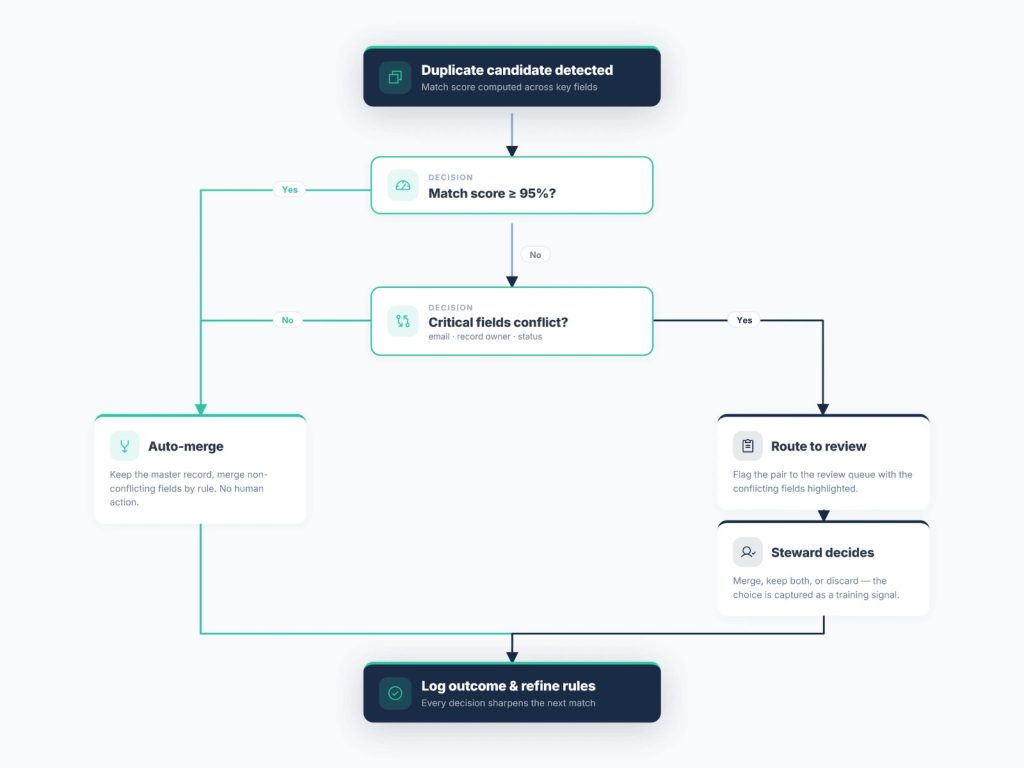
The auto-merge decision tree
- Exact key match? → Merge automatically.
- Fuzzy match only? → Human review. Always.
- One system is the source of truth? → Keep that version; archive the other with a pointer.
- Both versions partially complete? → Merge non-null fields into a golden record.
- Regulated data? → Log the merge, keep the undo.
Shutting off the duplicate factory
The uncomfortable truth about cleanup projects:
A one-time dedup decays within a quarter if the inflows stay open.
Prevention has three layers, cheapest first.
Layer 1 – Entry. Search-before-create habits plus native CRM duplicate rules. Salesforce’s take an admin under an hour to enable. Do it this week.
Layer 2 – Import. Match every list against existing records before loading, not after.
Layer 3 – Integration. The big one. This is where duplicates are manufactured at machine speed – and where identity tracking shuts the factory down.
How identity-tracked sync works
First sync: DBSync writes the Salesforce customer to QuickBooks and stores the cross-reference between the two record IDs.
Every sync after that is an upsert keyed on that identity. The one existing QuickBooks customer gets updated. No customer #2 on Tuesday. No customer #3 on Wednesday.
Both systems edited the same record between cycles? Conflict resolution applies your rule – source-of-truth wins, or last-modified wins – and updates the single record instead of spawning a second version to hold the disagreement.
One warning for bidirectional setups: merge echo. Merge two customers in System A, and the sync can recreate the deleted one from System B’s copy before B hears about the merge. Zombie records. Merges must propagate across integrations as merges – not as deletes the other side will undo.
What this looks like in DBSync
Cloud Workflow – every app-to-app template runs lookup-then-update on external IDs, never blind inserts. Bidirectional Salesforce ↔ QuickBooks keeps exactly one record on each side, every cycle, with conflict rules configurable per workflow.
Cloud Replication – warehouse writes are key-based and idempotent. Changes arrive via CDC from database sources or API-based incremental sync from CRM sources, and they update existing rows – never append copies. A retried job doesn’t double your customer table.
Neither replaces a historical cleanup if you’re already carrying years of duplicates. But they guarantee the pipe stops adding to the pile – the half of the problem most projects forget.
Want to see it against your own data first? The DBSync Playground runs identity-tracked syncs in a sandbox → mydbsync.com
Your 30-day dedup plan
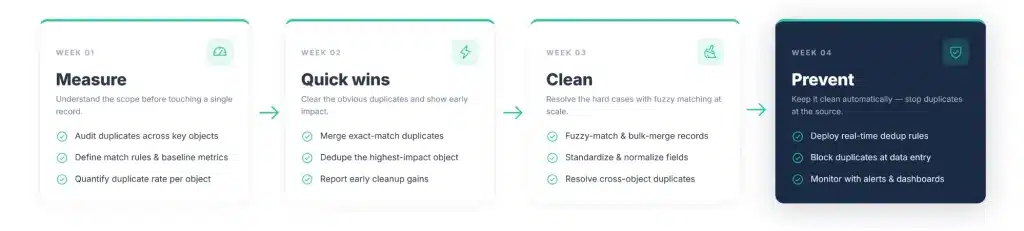
Week 1 – Measure
Run your first duplicate report in one query:
SELECT LOWER(TRIM(email)), COUNT(*)
FROM contacts
GROUP BY 1
HAVING COUNT(*) > 1;
Then score your exposure:
| # | In the last quarter… | Yes = 1 |
|---|---|---|
| 1 | Reps called accounts a colleague was already working | ☐ |
| 2 | A customer received a duplicate email or invoice | ☐ |
| 3 | Customer counts differ >5% between CRM and other tools | ☐ |
| 4 | Any sync inserts records without matching on external IDs | ☐ |
| 5 | A list was imported without dedup matching | ☐ |
| 6 | Nobody formally owns merge decisions | ☐ |
0–1: healthy. 2–3: you have a leak. 4+: run this full plan, starting Monday.
Pick one object to start – usually Accounts.
Week 2 – Quick wins
- Normalize: lowercase, trim, standardize phone formats, strip legal suffixes (Inc., LLC, Ltd.)
- Enable native CRM duplicate rules
- Auto-merge exact matches only – verified email, unique keys
Week 3 – Clean
- Run the fuzzy pass with blocking and confidence bands
- Route the 0.80–0.95 band to a named reviewer, timeboxed
- Merge with survivorship rules – and reparent every child record
Week 4 – Prevent
- Switch every sync to upsert on external IDs
- Set conflict resolution rules per integration
- Schedule the quarterly sweep and a monthly false-merge audit
After day 30, watch two numbers:
→ False-merge rate – audit a sample of auto-merges monthly; should be effectively zero. → Re-duplication rate – duplicates returning within 90 days. It’s the only metric that separates a successful program from a successful weekend.
Rapid-fire FAQ
What percentage of CRM data is duplicated? Industry estimates say 10–30%. Worst in leads and contacts fed by web forms, imports, and ID-blind syncs.
Deduplication vs. data cleansing – what’s the difference? Cleansing is the umbrella: fixing invalid, incomplete, inconsistent data. Dedup is one operation under it – usually the highest-payoff one.
Is this the same as storage deduplication? No. Storage dedup removes redundant data blocks in backups to save disk. This is record-level – duplicate customers, not duplicate bytes.
What’s a golden record? The merged survivor carrying the best value per field – phone from the CRM, billing address from the ERP.
Can deduplication be fully automated? Exact matches: yes. Fuzzy matches: only the high-confidence band. Hands-off fuzzy merging is a false-positive generator.
Does deduplication delete data? It shouldn’t. Merge, archive the losers with a pointer, keep the undo.
What happens to related records in a merge? They get reparented to the survivor – or the merge quietly removes years of history from your reports.
How often should it run? Prevention runs continuously. Matching sweeps quarterly – monthly if you have high-volume lead inflows.
Ready to sync your data – without the duplicates? Start free at mydbsync.com | Schedule a Demo | Try the Playground