Workflow Automation

Bringing Dynamics NAV Data into Oracle

Transfer ERP data from Microsoft Dynamics NAV into Oracle Database with reliable, automated pipelines. Reduce data latency, eliminate manual exports, and support enterprise reporting and integrations.

Faster cycle times
0 %
Records synced daily
> 0 B
Lesser manual work
0 %
Avg Sync Duration
< 0 min
Quick Setup Guide

How to Integrate Microsoft Dynamics NAV with Oracle Database

Connect Microsoft Dynamics NAV and Oracle Database in minutes using DBSync Cloud Workflow — no coding required. Use pre-built templates to automate data sync between both platforms.

1

Sign Up & Log In to DBSync

Go to mydbsync.com and click Start Free to create your account. Select Cloud Workflow as your product, activate your account, and log in to the DBSync console.

2

Add the Microsoft Dynamics NAV–Oracle Database Template

From the Home screen, click Add Template and browse the Template Library. Select the pre-built Microsoft Dynamics NAV to Oracle Database integration template and import it into your workspace.

3

Connect Your Microsoft Dynamics NAV Account

Open the imported project and navigate to the connector settings. Enter your Dynamics NAV Server URL, Company Name, and authentication credentials to connect DBSync.

4

Connect Your Oracle Database Account

On the same connector settings page, configure the Oracle Database connector. Enter your Oracle Host, Port, SID/Service Name, Username, and Password and select Oracle as the JDBC driver type.

5

Configure Mappings & Setup Variables

Review and customize pre-built field mappings in the Setup Wizard — map Microsoft Dynamics NAV objects like Customers, Items, Sales Orders, Invoices, and General Ledger Entries to corresponding Oracle Database tables and columns.

6

Run, Test & Schedule Your Integration

Click Run Now from the Task Screen to execute your first sync. Review the console logs to confirm the process completed successfully. Then navigate to the Schedule tab to automate recurring syncs at your preferred interval - Run sync every 5, 10, or 15 minutes, hourly, daily, or at a custom interval.

Start syncing in 4 simple steps

For workflow automation & process integration

1. Connect and authenticate your systems

Connect and authenticate your source and target systems

3. Schedule and automate syncs

Run automated syncs in real-time or scheduled batches

4. Monitor sync progress and logs

Setup notifications and alerts to monitor status and errors logs

Perfect for teams needing to automate data flows, update records, and trigger downstream processes.

Integrations and automation for every workflow

Automate operational processes across systems

Automatically trigger workflows when records change in one application to create, update, or transform data and push it into another system.

Reduce manual operations by 90%.

Maintain real-time data consistency between applications

Keep key entities like customers, accounts, orders, etc. consistent across apps with bi-directional or conditional sync logic.

Eliminate data mismatches and errors.

Enrich and transform data before it reaches its destination

Apply business rules, mapping logic, validations, and transformations before sending data downstream.

Standardize data across apps.

Everything you need to integrate your apps

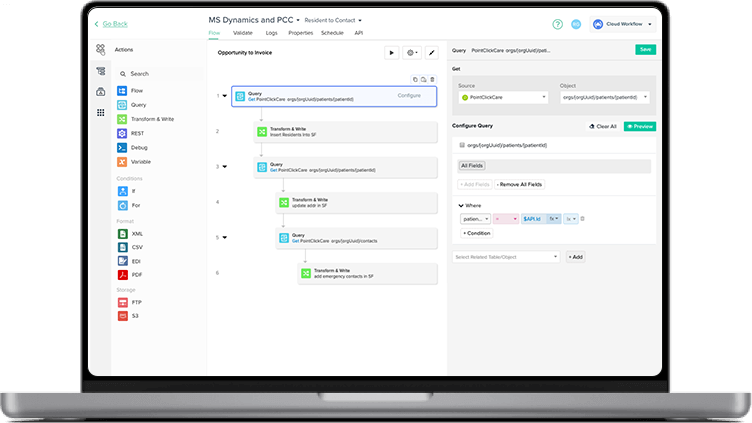
Visual workflow builder

Set up integrations easily without coding or IT dependency.

Real-time & scheduled triggers

Automate approvals, syncs, and handoffs instantly.

Advanced monitoring & logs

Review sync logs & trigger alerts via email or webhooks

Responsive enterprise support

Get in touch with our dedicated team via phone, email, and chat support.

Simple and transparent pricing

Always know what you’re paying with fixed, simple pricing plans.

Enterprise-grade security

Top-grade security standards with SOC 2, HIPAA, GDPR compliance.

Related resources

More records with the same manpower: Apex Biologix
Eliminate Double Data Entry with CRM-Accounting Integration
Reduce Cost By Reducing Double-Data Entry

What customers are saying about us

barracuda
Sarah Perry Business Intelligence Engineer

"DBSync helped us resolve everything quickly. The ROI came out about even. I believe we paid about 10-12K and saved 10-12K worth of my time. We were able to stabilize our CRM Sync and I was able to use my time on other ETL projects.”

Jason Lewin CMO of American Paper Optics

From an ROI standpoint, it's something that I feel like it paid for itself the first year that we had it. It freed us up 50% of the time. It's worth six figures to us in a year, in terms of time. It was a no brainer for us

Jonathan Edwards Project Manager at Virginia City Public Schools

Performance has just been crazy great with DBSync and we don't have multiple terabytes of data, but we do get above a terabyte in data! It's really just ease of use, management and having help there when and when you need it so they're there when you call.

Donna Murray Director of Finance at The Loan Synchronizations and Trading Association

The customer experience has been excellent! I am very honest to almost a fault so if there was ever an issue or ever a time that somebody was non-responsive to me I would in a heartbeat bring it up! There has never been an issue in all these years.

Matthew Orisi President - EduTek

It enabled us to grow and increase our capacity without increasing our overhead… if we didn't have DBSync, [we’d] have to have dedicated staff moving that data and double-checking that data between our CRM and our in-house accounting platform.

Schedule a Meeting

See DBSync in action

Integrate applications, automate workflows, and replicate data for improved efficiency and decision-making.

data transfer
Effortless Integration
Automated Workflows
Reliable Data Replication
Continuous Sync


Frequently Asked Questions

1. How do I integrate Microsoft Dynamics NAV with Oracle Database?
Microsoft Dynamics NAV can be integrated with Oracle Database using a data integration platform that transfers ERP data into Oracle systems for reporting, analytics, and enterprise applications.
2. What is the best tool to transfer Dynamics NAV data into Oracle?
The best tool to transfer Dynamics NAV data into Oracle is an integration platform that supports automated data pipelines, flexible schema mapping, and scheduled syncing between ERP and Oracle databases.
3. Can I automate ERP data pipelines from Dynamics NAV to Oracle Database?
Yes. ERP data pipelines from Microsoft Dynamics NAV to Oracle Database can be automated using integration tools that continuously move data without manual exports.
4. How do I reduce manual exports from Dynamics NAV to Oracle?
Manual exports can be reduced by implementing automated integration pipelines that sync Dynamics NAV ERP data directly into Oracle Database on a scheduled or real-time basis.
5. Does Dynamics NAV Oracle integration support real-time data syncing?
Yes. Dynamics NAV and Oracle integrations can support real-time or scheduled data syncing depending on configuration and integration architecture.

Ready to Automate NAV Data into Oracle

Start Free Trial Now

Talk to an Expert

One Step Away...

Get access to All our Demo and Tutorial videos, Case studies, White Papers and Webinar recordings - 50+ hours of content

DBSync Integration Platform
Privacy Overview

This website uses cookies so that we can provide you with the best user experience possible. Cookie information is stored in your browser and performs functions such as recognising you when you return to our website and helping our team to understand which sections of the website you find most interesting and useful.