How to Install DBSync from the HubSpot Marketplace (Step-by-Step Guide)
Introduction
If you are using HubSpot to manage your customer relationships and pipeline, chances are your financial data lives somewhere else, often in systems like QuickBooks Online or QuickBooks Desktop.
This disconnect between sales and finance can lead to manual data entry, delayed invoicing, and reconciliation errors.
With DBSync now officially listed on the HubSpot Marketplace, you can easily connect HubSpot with QuickBooks and automate your revenue-to-cash workflows, without complex development or long implementation cycles.
In this guide, you willl learn how to install DBSync from the HubSpot Marketplace and get started in just a few steps.
Why You Might Need DBSync with HubSpot
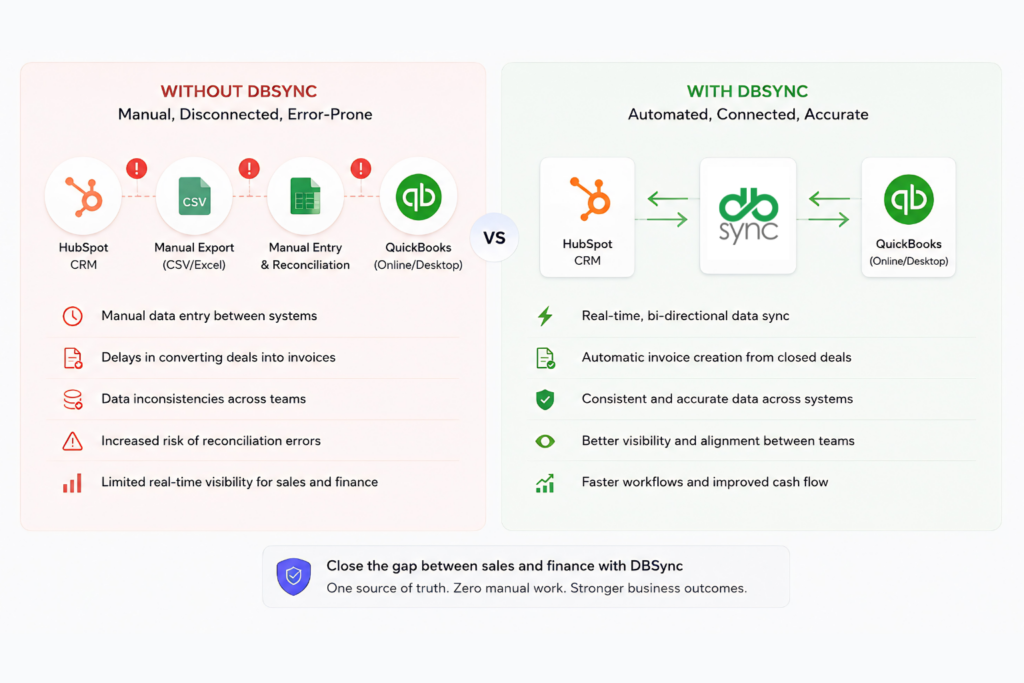
While HubSpot is a powerful CRM, it doesn’t operate in isolation. Most growing businesses rely on separate systems for accounting and finance, which creates common challenges:
- Manual data entry between HubSpot and accounting systems
- Delays in converting deals into invoices
- Data inconsistencies across sales and finance teams
- Increased risk of reconciliation errors
These gaps can slow down your operations and impact cash flow visibility.
What DBSync Does
DBSync is a data integration and workflow automation platform designed to connect business-critical systems like HubSpot and QuickBooks.
With DBSync, you can:
- Automatically sync data between CRM and accounting systems
- Enable bi-directional data flow between HubSpot and QuickBooks
- Configure integrations without writing code
- Ensure real-time or scheduled synchronization
This allows your sales and finance teams to work from a single, consistent source of truth.
Key Benefits of Using DBSync
Here’s what you can expect after connecting DBSync with HubSpot:
- Eliminate manual work
Automatically sync contacts, companies, deals, invoices, and payments - Faster revenue-to-cash cycle
Convert closed deals into invoices instantly - Improved data accuracy
Reduce errors caused by duplicate or manual entries - Better visibility across teams
Keep sales and finance aligned with real-time data - Operational efficiency gains
Many businesses report up to 30% reduction in processing time and 25% improvement in efficiency
Prerequisites Before Installation
Before installing DBSync from the marketplace, make sure you have:
- An active HubSpot account with appropriate permissions (Admin access recommended)
- Access to your QuickBooks account (Online or Desktop)
- A DBSync account (you can create one during installation)
- Clarity on what data you want to sync (e.g., contacts, deals, invoices)
Step-by-Step Guide to Install DBSync from HubSpot Marketplace
Follow these steps to install and set up DBSync:
Step 1: Visit the DBSync Listing
Go to the official DBSync app page on the HubSpot Marketplace:
https://ecosystem.hubspot.com/marketplace/listing/dbsync-192429
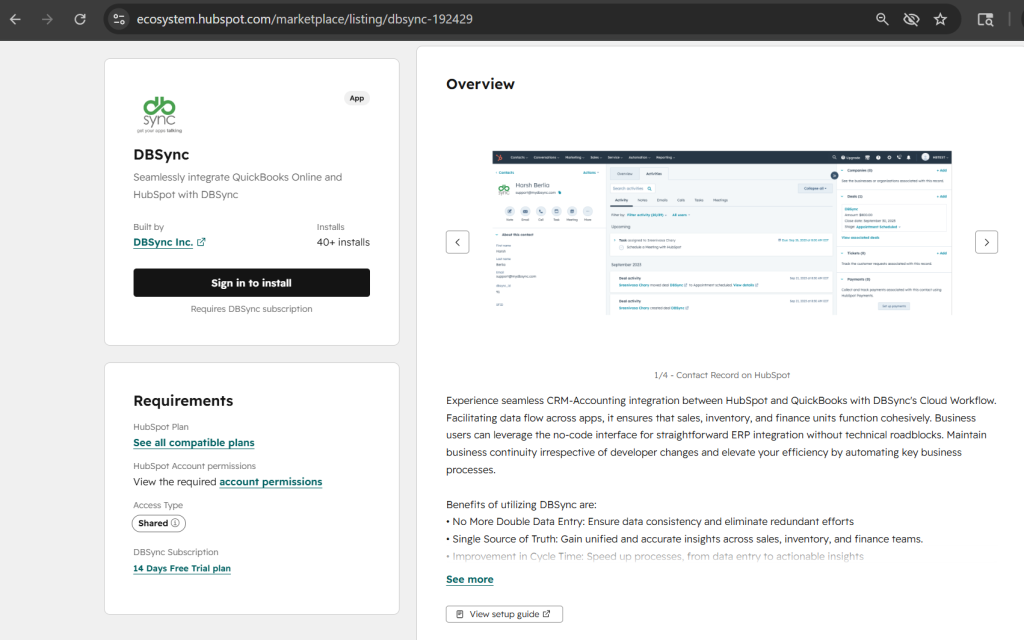
Step 2: Click “Sign in to Install App”
On the listing page, click the “Install App” button to begin the process.
Step 3: Log in to Your HubSpot Account
If you’re not already logged in, you’ll be prompted to sign in to your HubSpot account.
Step 4: Review and Grant Permissions
Review the permissions requested by DBSync and click “Connect app” to authorize access.
Step 5: Connect Your DBSync Account
- Log in to your existing DBSync account, or
- Create a new account (you can start with a 14-day free trial, no credit card required)
Step 6: Configure Your Integration
Once connected:
- Use the guided setup wizard
- Map fields between HubSpot and QuickBooks
- Choose sync direction (bi-directional or one-way)
- Set sync frequency (real-time or scheduled)
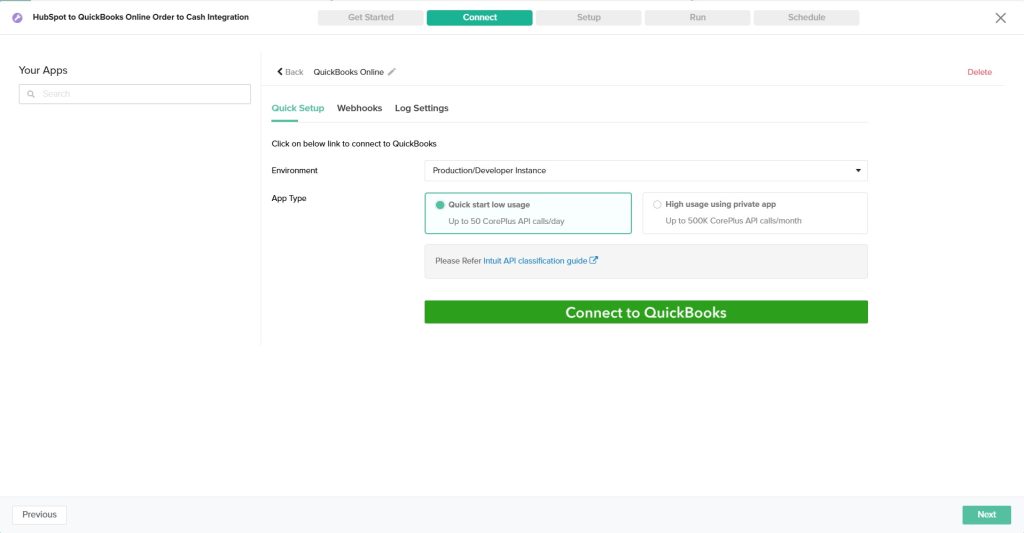
Most users can go live in a few hours, not weeks.
Additional Resources
- DBSync Documentation
https://docs.mydbsync.com/cloud-workflow - View Setup Guide (HubSpot to QuickBooks – Order to Cash)
https://docs.mydbsync.com/cloud-workflow/template-library/hubspot-to-quickbooks-online-order-to-cash - Learn More About the HubSpot Connector
https://docs.mydbsync.com/cloud-workflow/connectors/hubspot
Final Thoughts
The availability of DBSync on the HubSpot Marketplace makes it easier than ever to connect your CRM with your accounting systems.
Instead of relying on manual processes and disconnected data, you can now automate your workflows, improve accuracy, and accelerate your revenue cycle, all with a few clicks.
If you’re looking to close the gap between sales and finance, installing DBSync is a strong first step.