Salesforce and QuickBooks Integration

Reclaim valuable hours and eliminate double data entry. Enable bidirectional integration between Salesforce and QuickBooks Online/Desktop to automate your financial workflows, ensuring seamless data flow and turning order entry into effortless accounting.

Salesforce, Quickbooks Online or Desktop

Supported MS Dynamics 365 apps

Connect Salesforce with accounting, ERP, e-commerce, databases, and 50+ apps.

Connect HubSpot with databases, accounting tools, analytics platforms, and more.

Sync Dynamics 365 with databases, analytics platforms, finance systems, and more.

Sync Dynamics 365 with databases, analytics platforms, finance systems, and more.

Integrate Business Central with CRM, e-commerce, and 50+ systems.

Automate customer, invoice, and payment sync with QuickBooks.

Connect Xero with CRM, commerce, and 50+ apps.

Integrate NetSuite with CRM, commerce, and 50+ platforms.

Sync Shopify orders, customers, and payments with CRM, accounting and 50+ systems.

Automate shipping and order updates across sales and 50+ systems.

Sync inventory and order workflows across commerce, ERP, accounting, and 50+ apps.

Automate file-based workflows using data stored in AWS S3

Load data into MinIO from business and data systems.

Automate recurring file transfers across applications and databases.

Move data in and out of SQL Server with reliable, incremental replication

Move data in and out of MySQL with reliable, incremental replication.

Move data in and out of PostgreSQL with reliable, incremental replication.

Move data in and out of MongoDB with reliable, incremental replication.

Move data in and out of Oracle with reliable, incremental replication.

Ingest structured data into AWS Redshift using scalable, incremental pipelines.

Move data in and out of Snowflake with reliable, incremental replication.

Ingest structured data into IBM DB2 using scalable, incremental pipelines.

Move data in and out of Databricks with reliable, incremental replication.

Ingest structured data into ADLS Gen2 using scalable, incremental pipelines.

Choose your integration

1. Detects changes at the source

Captures new and updated records without relying on full reloads.

2. Tracks state incrementally

Maintains sync state so pipelines resume predictably.

3. Loads warehouse-ready data

Adapts to evolving source schemas without breaking downstream jobs.

4. Loads warehouse-ready data

Data stands structured and analytics-friendly.

How DBSync replication works in production

4. Webhooks

Receive real-time notifications about synchronization events.

Webhooks allow DBSync to emit events that external systems can react to, enabling event-driven data workflows.

Webhooks are commonly used to trigger downstream processing, alerting, or workflow orchestration.

Supported events

What DBSync handles so you don’t have to

crm shape 2

Get Started

This is where most custom replication pipelines quietly turn into long-term tech debt.

Sound familiar?

Here's what data misalignment costs teams every day:

48+ hours/week lost

Teams chasing missing records and fixing bad imports.

3 different answers

The same metric shows different numbers in each tool, and no one knows which to trust.

Team friction

Different teams pointing fingers over number discrepancies.

Use cases

Automated Workflows you can Launch in Minutes

Keep deals, orders, invoices, and payments flowing automatically across CRM, ERP, and accounting.

Push quantity-on-hand, stock levels, and availability updates into CRM so reps always know what’s ready to sell.

Auto-convert leads to deals, orders, and invoices instantly so Sales can move faster without waiting on Finance.

Automatically process, transform, and route files across systems to eliminate manual upload and data entry tasks.

Keep CRM, ERP, and workflow data synchronized into on-prem or cloud databases or warehouses for analytics, reporting, and compliance.

Give reps real-time visibility into which invoices are paid, overdue, or pending, directly inside CRM.

Keep order status, shipping confirmations, and fulfillment data updated across ERP, CRM, and customer portals automatically.

No-code Setup

Seamlessly replicate Salesforce data to databases and data lakes for enhanced data accessibility and analysis.

Easy to use

Easily set up and structure data warehouses with our intuitive no-code or low-code.

Boost Efficiency

Automate data copying, freeing DBAs to focus on strategic, high-value tasks.

Seamless Invoice Generation

Automate invoice creation in the accounting/ERP system from sales activities logged in the CRM, improving billing efficiency.

Enhanced Financial Visibility

Provide sales teams with access to financial data within CRM for a comprehensive view of customer accounts, enabling better sales decisions.

Accurate Revenue Forecasting

Integrate CRM sales data with accounting/ERP for real-time revenue tracking and more accurate forecasting.

Contact Integration Expert

Questions about our product, pricing, or offerings? Fill in the form below and we will contact you. We endeavor to answer all inquiries within 24 hours on business days.

Edit Content

Click on the Edit Content button to edit/add the content.

Unify Sales and Accounting Data

Transform your order to cash process with seamless integration and give back time to your team to focus on strategic activities

shape 5 1
shape 5 1

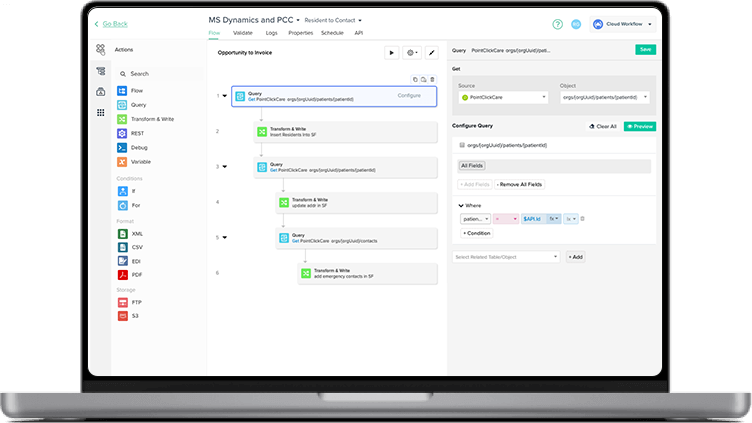
Integrate in Three Simple Steps

Connect->Setup->Run   That’s how easy it is to power your integration. Give it a go!

Connect Your Accounts

Authorize connections to both Salesforce and Quickbooks through our secure platform.

STEP 1
Configure Your Sync Settings

Simply fill out a form and schedule your integration to run based on your preferred frequency .

STEP 2
Activate and Monitor

Start the synchronization process with a single click. Monitor sync activities via logs and notify your team.

STEP 3
crm shape 2
Get started

Want to learn how we can help automate your business in less than an hour?

crm mockup cta

"DBSync's QuickBooks auto-sync saved weeks for PhoCus Wright Inc. Salesforce's top recommendation for accounting integration resulted in significant ROI, freeing up weeks of the finance director's time for more strategic tasks."

Phocuswright-logo

When Every Number and Data Matches

arrow
Time saved annually
0 +

Teams stop reconciling reports and get time back for real work.

Faster decisions
0 x

Leaders move quickly on growth opportunities because they trust every dashboard is telling the same story.

Aligned, high-performing teams
0 %

All teams align on the same numbers and priorities.

"DBSync's QuickBooks auto-sync saved weeks for PhoCus Wright Inc. Salesforce's top recommendation for accounting integration resulted in significant ROI, freeing up weeks of the finance director's time for more strategic tasks."

When Every Number and Data Matches

arrow ai
Time saved annually
0 + hrs

Teams stop reconciling reports and get time back for real work.

Faster decisions
0 x

Leaders move quickly on growth opportunities because they trust every dashboard is telling the same story.

Aligned, high-performing teams
0 %

All teams align on the same numbers and priorities.