
Workflow Automation

QuickBooks data, ready for Amazon Redshift analytics

Move financial and transactional data from QuickBooks into Amazon Redshift for scalable analytics and reporting. Automate data pipelines, reduce manual exports, and keep analytics environments consistently up to date.

Middle Image
Faster cycle times
0 %
Records synced daily
> 0 B
Lesser manual work
0 %
Avg Sync Duration
< 0 min

Start syncing in 4 simple steps

For workflow automation & process integration

1. Connect and authenticate your systems

Connect and authenticate your source and target systems

3. Schedule and automate syncs

Run automated syncs in real-time or scheduled batches

4. Monitor sync progress and logs

Setup notifications and alerts to monitor status and errors logs

Perfect for teams needing to automate data flows, update records, and trigger downstream processes.

Integrations and automation for every workflow

Automate operational processes across systems

Automatically trigger workflows when records change in one application to create, update, or transform data and push it into another system.

Reduce manual operations by 90%.

Maintain real-time data consistency between applications

Keep key entities like customers, accounts, orders, etc. consistent across apps with bi-directional or conditional sync logic.

Eliminate data mismatches and errors.

Enrich and transform data before it reaches its destination

Apply business rules, mapping logic, validations, and transformations before sending data downstream.

Standardize data across apps.

Everything you need to integrate your apps

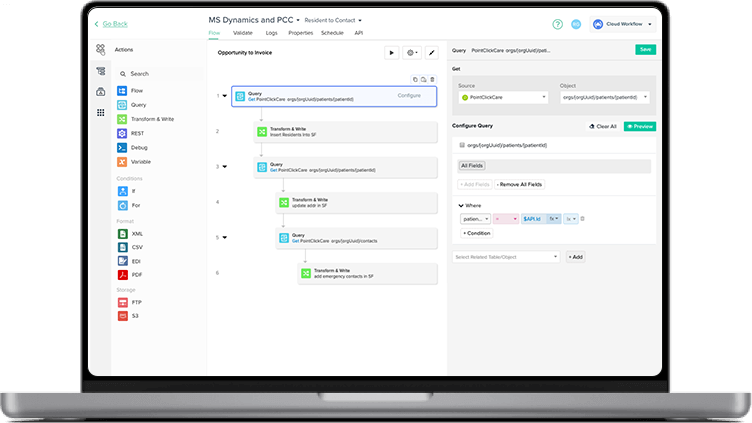
Visual workflow builder

Set up integrations easily without coding or IT dependency.

Real-time & scheduled triggers

Automate approvals, syncs, and handoffs instantly.

Advanced monitoring & logs

Review sync logs & trigger alerts via email or webhooks

Responsive enterprise support

Get in touch with our dedicated team via phone, email, and chat support.

Simple and transparent pricing

Always know what you’re paying with fixed, simple pricing plans.

Enterprise-grade security

Top-grade security standards with SOC 2, HIPAA, GDPR compliance.

Related resources

More records with the same manpower: Apex Biologix
Eliminate Double Data Entry with CRM-Accounting Integration
Reduce Cost By Reducing Double-Data Entry

What customers are saying about us

Sarah Perry Business Intelligence Engineer

"DBSync helped us resolve everything quickly. The ROI came out about even. I believe we paid about 10-12K and saved 10-12K worth of my time. We were able to stabilize our CRM Sync and I was able to use my time on other ETL projects.”

Jason Lewin CMO of American Paper Optics

From an ROI standpoint, it's something that I feel like it paid for itself the first year that we had it. It freed us up 50% of the time. It's worth six figures to us in a year, in terms of time. It was a no brainer for us

Jonathan Edwards Project Manager at Virginia City Public Schools

Performance has just been crazy great with DBSync and we don't have multiple terabytes of data, but we do get above a terabyte in data! It's really just ease of use, management and having help there when and when you need it so they're there when you call.

Donna Murray Director of Finance at The Loan Synchronizations and Trading Association

The customer experience has been excellent! I am very honest to almost a fault so if there was ever an issue or ever a time that somebody was non-responsive to me I would in a heartbeat bring it up! There has never been an issue in all these years.

Matthew Orisi President - EduTek

It enabled us to grow and increase our capacity without increasing our overhead… if we didn't have DBSync, [we’d] have to have dedicated staff moving that data and double-checking that data between our CRM and our in-house accounting platform.

Schedule a Meeting

See DBSync in action

Integrate applications, automate workflows, and replicate data for improved efficiency and decision-making.

Effortless Integration
Automated Workflows
Reliable Data Replication
Continuous Sync


Frequently Asked Questions

1. How do I move QuickBooks data to Amazon Redshift?
QuickBooks data can be synced to Amazon Redshift using an integration platform like DBSync that automatically transfers financial data into Redshift tables for analytics.
2. What is the best way to integrate QuickBooks with Amazon Redshift for analytics?
The best approach is to use an automated data integration tool that moves accounting data from QuickBooks into Redshift for reporting and business intelligence.
3. Can I automate financial data pipelines from QuickBooks to Redshift?
Yes. DBSync automates data pipelines that sync financial transactions, invoices, and customer records from QuickBooks into Redshift.
4. How does QuickBooks Redshift integration support business intelligence?
By syncing accounting data into Amazon Redshift, teams can analyze financial metrics using BI tools and dashboards.
5. Does QuickBooks Amazon Redshift integration sync data in real time?
Depending on configuration, DBSync supports scheduled or near real-time syncing of QuickBooks data into Redshift.

Ready to Automate QuickBooks and Amazon Redshift

Start Free Trial Now

Talk to an Expert